Behind the Scenes: How Seamless Software Updates Keep Your Devices Running Smoothly
In 2017, a ransomware attack called WannaCry infected hundreds of thousands of computers across more than 150 countries — and the vast majority of victims were running systems that had an available patch sitting unused. The fix existed. People just hadn't applied it. That single fact reframes the whole conversation about software updates: they aren't a minor housekeeping task. They're the difference between a functioning device and a compromised one.
Most people experience updates as an interruption — a progress bar at the worst possible moment, a forced restart before a meeting. But underneath that frustration is a genuinely sophisticated engineering problem: how do you push new code to billions of devices, across wildly different hardware configurations, without breaking anything? The answer involves more moving parts than most users ever see.
Background and Context: The Scale Problem Nobody Talks About
What Makes Updating Billions of Devices So Hard?
When a company like Apple or Google ships an operating system update, they're not sending a single file to a single machine. They're orchestrating a delivery to hundreds of millions of devices simultaneously — each with different storage capacity, network conditions, battery levels, and installed apps. The logistics alone are staggering.
A concrete example: when Apple releases a major iOS update, it typically uses a content delivery network (CDN) spread across multiple providers to distribute the load. Without that, the sheer volume of download requests would overwhelm any single infrastructure. Even so, Apple staggers rollouts — not everyone gets the update notification on day one. That's intentional.
The counterintuitive part is that 'smaller' updates are sometimes harder to engineer than full replacements. Delta updates — which send only the changed portions of code rather than the entire package — require the update system to know exactly what version a device is currently running, calculate the diff precisely, and apply it without corrupting the existing installation. One wrong byte and the device won't boot.
The Challenge They Faced: When Updates Become the Problem
How a Routine Update Can Go Catastrophically Wrong
In July 2024, a faulty content configuration update pushed by cybersecurity firm CrowdStrike caused an estimated 8.5 million Windows machines to crash simultaneously — displaying the infamous blue screen of death. Airlines grounded flights. Hospitals delayed procedures. Banks went offline. And the fix required manually rebooting each affected machine into safe mode and deleting a specific file. There was no remote patch. Someone had to physically touch the hardware.
That incident exposed something the industry had quietly known for years: the same mechanism that makes seamless updates possible — automatic, trusted, deeply integrated delivery systems — also creates a single point of catastrophic failure. The more seamless the update pipeline, the more damage a bad update can do before anyone catches it.
The very feature that makes automatic updates powerful — speed and reach — is exactly what makes a bad update so devastating. Seamless delivery cuts both ways.
Before CrowdStrike, there was the 2016 Dyn DNS attack, which wasn't an update failure but illustrated the same fragility: centralized infrastructure, once compromised or broken, cascades outward faster than any human team can respond. Update systems face the same architectural tension every time a new release ships.
The Testing Gap
Even well-resourced teams can't test every possible device configuration. A company might have thousands of QA machines, but real-world deployments involve combinations of third-party drivers, legacy software, regional network quirks, and hardware revisions that no lab can fully replicate. This is why enterprise IT departments often delay updates by weeks — they run their own internal testing before allowing a patch to touch production systems.

What They Did — Step by Step: The Engineering Behind Smooth Rollouts
Staged Rollouts and Canary Deployments
The standard playbook for a major update now looks nothing like 'flip a switch and ship to everyone.' Modern teams use staged rollouts — releasing to 1% of users first, monitoring crash rates and error telemetry, then expanding to 5%, 10%, and so on. If something breaks at the 1% stage, the blast radius is contained.
This approach is called a canary deployment, borrowing from the old mining practice of using canaries to detect toxic gas. A small group of real users becomes the early warning system. Google has used this model for Chrome updates for years, and it's now standard across most major platforms. The trick is having robust telemetry — the ability to see, in near real-time, whether the update is causing problems on those early machines.
A/B Testing at the OS Level
Some platforms go further, running A/B tests on update components before committing to a full rollout. Android's modular update system — Project Mainline, introduced around 2019 — allows Google to update individual OS components through the Play Store without requiring a full system update. This means a security fix in the networking stack can ship independently of a change to the media codec. Smaller surface area, lower risk.
Rollback Mechanisms and Dual-Partition Systems
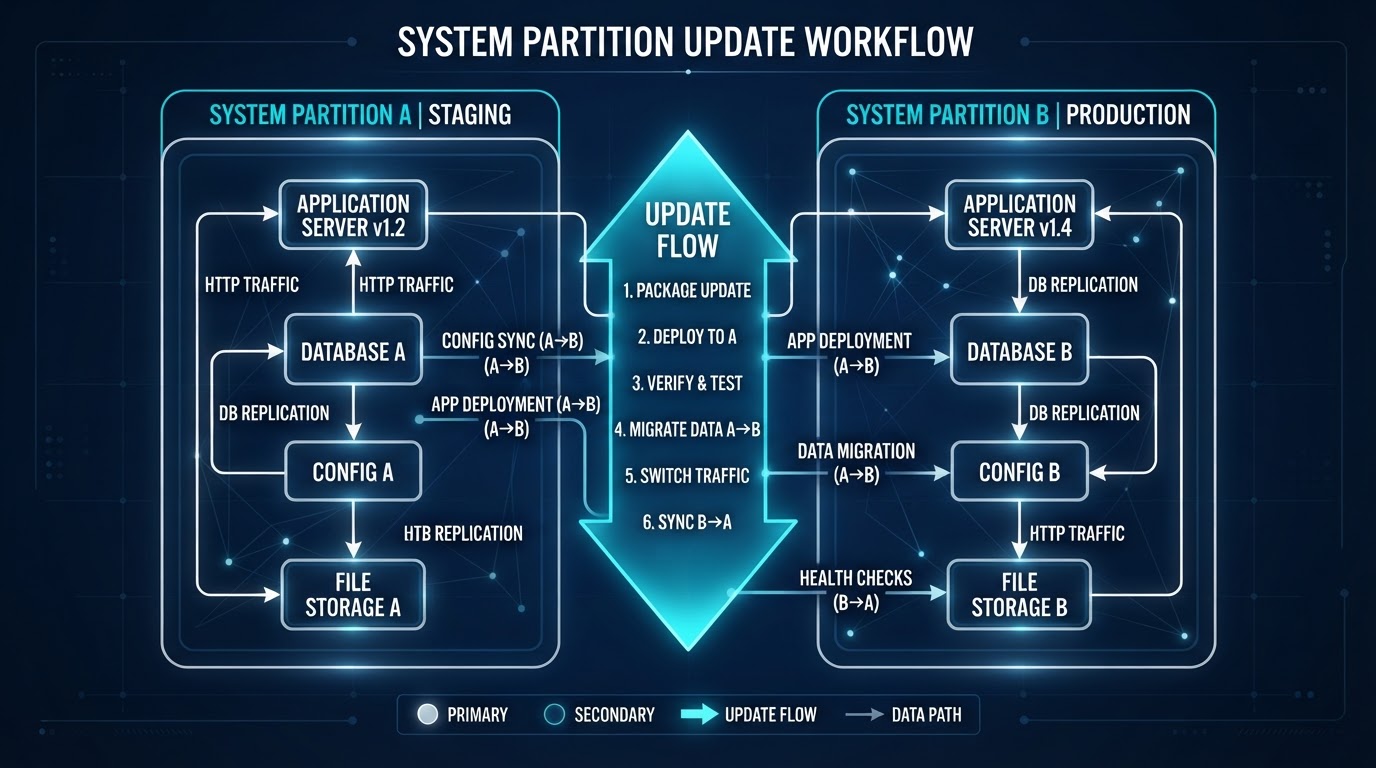
One of the smartest engineering decisions in modern update design is the dual-partition system. Android devices running version 7.0 and later use A/B system updates, where the device maintains two complete copies of the system partition. The update installs silently in the background on the inactive partition. If the new version fails to boot correctly, the device automatically rolls back to the previous working partition — no user intervention required.
A dual-partition system means your phone is always one reboot away from the last known good state. It's the update equivalent of a safety net you never have to think about.
This is the kind of operational detail that rarely makes headlines but represents years of engineering effort. Early Android updates required the device to be plugged in, showed a progress animation for minutes, and had a real chance of bricking the phone if interrupted. The current system handles most of that invisibly, while you're using the device.
Results and Key Lessons: What the Best Update Systems Get Right
Speed Versus Safety — and Why You Can't Always Have Both
The CrowdStrike incident and the WannaCry outbreak sit at opposite ends of the same problem. Move too slow on updates, and unpatched vulnerabilities pile up. Move too fast without adequate safeguards, and a single bad file takes down global infrastructure. The organizations that navigate this best tend to share a few characteristics.
First, they treat rollback as a first-class feature, not an afterthought. Second, they invest heavily in observability — the ability to see what's happening on devices after an update ships, not just before. Third, they maintain a clear separation between security patches and feature updates, so critical fixes don't get delayed waiting for a larger release to be ready.
The Human Factor
Technology aside, the biggest variable in update success is user behavior. Research consistently shows that a significant portion of users delay or disable automatic updates — often citing the exact frustrations that engineers work hardest to eliminate: unexpected restarts, slowdowns, changed interfaces. The irony is that the updates designed to protect those users are the ones they're most likely to skip.
Enterprise environments handle this through policy enforcement — updates are mandatory and scheduled during off-hours. Consumer devices have moved toward making updates harder to ignore, with automatic background installs and smaller, more frequent patches rather than large infrequent ones. Neither approach is perfect, but the trend is clearly toward removing the decision from the user entirely.
(Opinion: That shift — from 'you should update' to 'it already updated' — is probably the right call for security, even if it feels paternalistic. The average person shouldn't need to understand patch management to have a secure device. The engineering burden belongs with the platform, not the user.)

Frequently Asked Questions
Why do software updates sometimes make my device slower?
New software versions often include additional features, expanded security checks, or background processes that consume more resources than the previous version. Older hardware may struggle with the increased load. In some cases, updates also reset performance optimizations that had been tuned to your specific usage patterns, which can take days to recalibrate.
Is it safe to delay updates for a few weeks to let others find the bugs first?
For feature updates, waiting a week or two is a reasonable strategy — staged rollouts mean major bugs often surface quickly and get patched fast. For security updates, delaying is genuinely risky. Vulnerabilities are frequently disclosed publicly at the same time a patch ships, meaning attackers know exactly what to exploit on unpatched systems. Security patches should be applied promptly.
What happens if a software update fails halfway through?
On modern devices with dual-partition systems (most Android phones from 2016 onward, and many other platforms), a failed update triggers an automatic rollback to the previous working version. On older systems or platforms without this safeguard, a failed mid-update could leave the device in an unbootable state requiring a factory reset or manual recovery. This is why update systems increasingly install in the background before the device ever restarts.
The WannaCry attack and the CrowdStrike outage are separated by seven years and completely different failure modes — one exploited neglect, the other exploited trust. What they share is a reminder that software update infrastructure is now load-bearing for civilization in a way that wasn't true a generation ago. Hospitals, power grids, financial systems, and air traffic control all run on software that must be updated, and must be updated safely. The engineering has gotten remarkably good. The margin for error, though, hasn't gotten any wider.



Comments
Post a Comment